
Tic Tac Toe is a game played by two players on a grid of 3X3 squares. The challenge is to place three consecutive Os or Xs by one player in a row, column or diagonal. The player who does so is the winner. The game ends in a draw if all the squares are filled with Os or Xs but not in a row, column or diagonal. We will create the Tic Tac Toe Mini VB.NET Project to let you understand the concept of event handling and coding in VB.NET
Design interface of Tic Tac Toe Mini VB.NET Project
The design interface of this game is created with 9 buttons arranged in 3 rows and 3 columns. When a button is clicked by a player its colour changes according to the colour assigned to players in the labels Player1 and Player2.
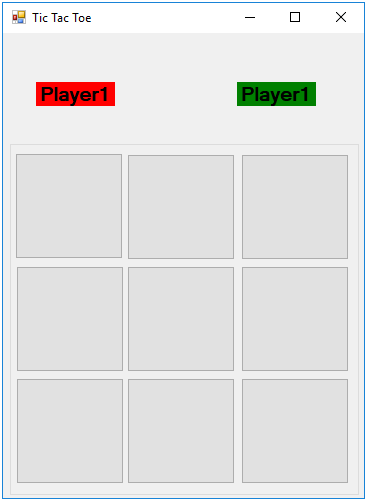
Controls and their names
Three labels
- Label1- to store the array storing which player clicked which button from index 1 to 9. Its Visible property is set to false
- Label2 – Text property Player1 and backcolor property Red
- Label3 – Text property Player2 and backcolor property Green
Nine Buttons– Button1 to Button9
Working of Tic Tac Toe Mini VB.NET Project
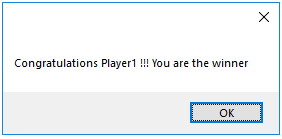
When the game is executed the interface is presented to the players who can take turn to click one out of nine buttons. As soon as a button is clicked the button changes its color. When one player succeeds in drawing three consecutive buttons (row/column/diagonal) with his assigned color he is declared a winner. A message box is displayed with the player who wins.
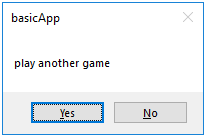
After finishing a game the players are asked if they wish to play again. On clicking yes button the buttons are set to the basic color and the players can start again.
Code Implementation
Variable declaration for Tic Tac Toe Mini VB.NET Project
    Dim player1, player2 As Boolean ‘ indicate which player has played his turn
    Dim bc() As Integer ‘ for storing which button is clicked by which players(1/2)
    Dim i As Integer ‘ counter for for loop
    Dim winn As Integer ‘ storing the player number of winner
    Dim tot As Integer
    Dim fin As Boolean
Form load event to initialize the variables
 Private Sub tictactoe_Load(sender As Object, e As EventArgs) Handles Me.Load
        Dim i As Integer
        ReDim bc(8)
        For i = 0 To 8
            bc(i) = 0
        Next
        i = 0
        tot = 0
        player1 = True
        player2 = False
        winn = 0
        fin = True
        btnRefresh.Focus()
    End Sub
Refresh Button code
 Private Sub btnRefresh_Click(sender As Object, e As EventArgs) Handles btnRefresh.Click
        tttReset()
End Sub
Button1 to button 9 click are handled by one click event
 Private Sub Button1_Click(sender As Object, e As EventArgs) Handles Button1.Click, Button2.Click, Button3.Click, Button4.Click, Button5.Click, Button6.Click, Button7.Click, Button8.Click, Button9.Click
        Dim sname As String
        Dim res
        sname = CStr(sender.name)
        i = Mid(sname, Len(sname), 1) - 1

        If player1 Then
            sender.BackColor = Color.Red
            player1 = False
            player2 = True
            bc(i) = 1
        Else
            sender.BackColor = Color.Green
            player1 = True
            player2 = False
            bc(i) = 2
        End If
        Label1.Text = ""
        For i = 0 To 8
            Label1.Text = Label1.Text + CStr(bc(i))
        Next
        'checking all rows

        If Mid(Label1.Text, 1, 3) = "111" Then
            winn = 1
        End If
        If Mid(Label1.Text, 1, 3) = "222" Then
            winn = 2
        End If
        If Mid(Label1.Text, 7, 3) = "111" Then
            winn = 1
        End If
        If Mid(Label1.Text, 7, 3) = "222" Then
            winn = 2
        End If
        If Mid(Label1.Text, 4, 3) = "111" Then
            winn = 1
        End If
        If Mid(Label1.Text, 4, 3) = "222" Then
            winn = 2
        End If

        'checking all columns
        If CStr(bc(0)) + CStr(bc(3)) + CStr(bc(6)) = "111" Then
            winn = 1
        End If
        If CStr(bc(0)) + CStr(bc(3)) + CStr(bc(6)) = "222" Then
            winn = 2
        End If
        If CStr(bc(1)) + CStr(bc(4)) + CStr(bc(7)) = "111" Then
            winn = 1
        End If
        If CStr(bc(1)) + CStr(bc(4)) + CStr(bc(7)) = "222" Then
            winn = 2
        End If
        If CStr(bc(2)) + CStr(bc(5)) + CStr(bc(8)) = "111" Then
            winn = 1
        End If
        If CStr(bc(2)) + CStr(bc(5)) + CStr(bc(8)) = "222" Then
            winn = 2
        End If

        'checking all diagonal positions
        If CStr(bc(0)) + CStr(bc(4)) + CStr(bc(8)) = "111" Then
            winn = 1
        End If
        If CStr(bc(0)) + CStr(bc(4)) + CStr(bc(8)) = "222" Then
            winn = 2
        End If
        If CStr(bc(2)) + CStr(bc(4)) + CStr(bc(6)) = "111" Then
            winn = 1
        End If
        If CStr(bc(2)) + CStr(bc(4)) + CStr(bc(6)) = "222" Then
            winn = 2
        End If

        'printing winners name and message
        If winn = 1 Or winn = 2 Then
            MessageBox.Show("Congratulations Player" & CStr(winn) & " !!! You are the winner")
            res = MsgBox("play another game", vbYesNo)

            If res = vbYes Then
                tttReset()
            Else
                Me.Close()
            End If
        Else

            For i = 0 To 8
                If bc(i) <> 0 Then
                    fin = True
                Else
                    fin = False
                End If
            Next
            If fin = True Then
                MessageBox.Show("Its a Draw")

                res = MsgBox("play another game", vbYesNo, Me.Text)

                If res = vbYes Then
                    tttReset()
                Else
                    Me.Close()
                End If
            End If
        End If
    End Sub
User define procedure to refresh the game Tic Tac Toe Mini VB.NET Project
 Private Sub tttReset()
        Label1.Text = ""
        winn = 0
        tot = 0
        fin = True
        For i = 0 To 8
            bc(i) = 0
        Next
        If winn = 2 Then
            player2 = True
            player1 = False
        Else
            player1 = True
            player2 = False
        End If
        Button1.BackColor = DefaultBackColor
        Button2.BackColor = DefaultBackColor
        Button3.BackColor = DefaultBackColor
        Button4.BackColor = DefaultBackColor
        Button5.BackColor = DefaultBackColor
        Button6.BackColor = DefaultBackColor
        Button7.BackColor = DefaultBackColor
        Button8.BackColor = DefaultBackColor
        Button9.BackColor = DefaultBackColor
End Sub